
Think of a standard FiveM server as a bare-bones version of Grand Theft Auto V. It has the map, the physics, and the basic mechanics, but that’s about it. FiveM scripts are the magic that transforms this empty shell into a living, breathing world with its own rules, jobs, and activities.
They are essentially packages of code, usually written in Lua or JavaScript, that you add to your server. Each script introduces a new feature—it could be something small, like a custom car speedometer, or something massive, like an entire police department system with ranks, dispatch, and evidence logging.
What Are FiveM Scripts and How Do They Work?
Let’s stick with the blank canvas idea. A fresh FiveM server is that canvas. Scripts are your brushes and paint. You use them to create a unique masterpiece, whether that’s a hardcore roleplay city, a chaotic racing server, or a zombie survival simulation.
These scripts are the very foundation of server customization. They are collections of instructions that tell the game how to behave differently, adding new elements and dictating how players interact with the world and each other. Without them, every server would just be a generic copy of the next.
The Engine Behind Custom Gameplay
The FiveM platform was built from the ground up to support this kind of creativity. It’s a modification for GTA V that lets anyone host their own multiplayer server, completely separate from the official GTA Online. Since it launched, it’s become the go-to platform for thousands of communities, especially those focused on roleplaying. You can check out the official FiveM site to see what makes it so powerful.
This is what allows server owners to add game mechanics you’d never see in the base game. A script can do almost anything you can imagine:
- Custom Jobs: Create a mechanic job where players can actually pop the hood and repair engine parts.
- Player-Owned Businesses: Let players buy, run, and profit from a nightclub or a car dealership.
- Realistic Economies: Implement banking systems, paychecks for jobs, and item prices that change based on supply and demand.
- Advanced UI Elements: Add custom inventory screens, hunger and thirst meters, or unique phone interfaces.
A great example of a complex script is something like the Tebex Drug System. It doesn’t just add “drugs” to the game; it creates a whole gameplay loop around gathering raw materials, processing them at specific locations, and then finding a way to sell the finished product without getting caught. That’s the power of a good script—it creates systems that players can engage with for hours.
At its core, a FiveM script works by listening for things that happen in the game (like a player pressing a button or entering an area) and then executing new code to create a custom outcome. This is how you build an experience that people will remember and come back for.
From Blank Canvas to Thriving World
Ultimately, scripts give you, the server owner, complete control. You get to decide every single detail of the world your players will experience. By carefully selecting and configuring scripts, you can build a server that feels truly unique.
The best part is that it’s all modular. You can start with a few basic scripts for jobs and money, and as your community grows, you can add more complex systems like housing, gangs, or custom events. Knowing which scripts to choose and how to make them work together is the most important skill for any server owner. If you’re just starting out, our guide on managing FiveM servers is the perfect place to learn the ropes. Your script library is what defines your server, making it the most critical part of your project.
Choosing Your Foundation: ESX vs. QBCore Scripts
Before you even think about adding cool cars or custom jobs, you have to pour the foundation for your server. This foundation is called a framework, and it’s like the operating system that all your other FiveM scripts will run on. When it comes to FiveM, two names stand out from the crowd: ESX (EssentialMode Extended) and QBCore.
Think of it like this: choosing a framework is like deciding whether to build a house from a pre-made kit or from a custom-designed blueprint. ESX is the well-established kit with tons of available parts, while QBCore is the modern, performance-focused blueprint.
This is a big decision. The framework you pick will affect every single script you add down the road, so let’s break down what makes each one tick.
Breaking Down ESX: The Veteran Framework
ESX has been around for a long time in the FiveM world. Its main claim to fame is the absolutely massive number of scripts available for it. For years, if you were a developer, you built for ESX. That means there’s a gigantic library of both free and paid resources out there.
If you can dream of a feature, there’s probably an ESX script for it. The trade-off? Because it’s older and has been built upon for so long, it can sometimes be a bit clunky and less efficient. You might find yourself wrestling with older code that can slow your server down if you’re not careful.
Understanding QBCore: The Modern Alternative
QBCore came about as a direct answer to some of ESX’s weak points. It was built from scratch with a heavy focus on performance, security, and clean, logical code. This approach makes it a huge favorite among developers who want a stable and speedy server for the long haul.
The selection of scripts for QBCore isn’t as vast as ESX’s, but it’s growing fast, and the quality is generally very high. Scripts are typically built with modern practices in mind, which often means better performance right out of the box. If you want a rock-solid base for a highly customized server, QBCore is a fantastic pick. You can find tons of great QBCore scripts that really show off what the framework can do.
This image gives a quick visual on what server owners prioritize when they’re picking out scripts and frameworks.
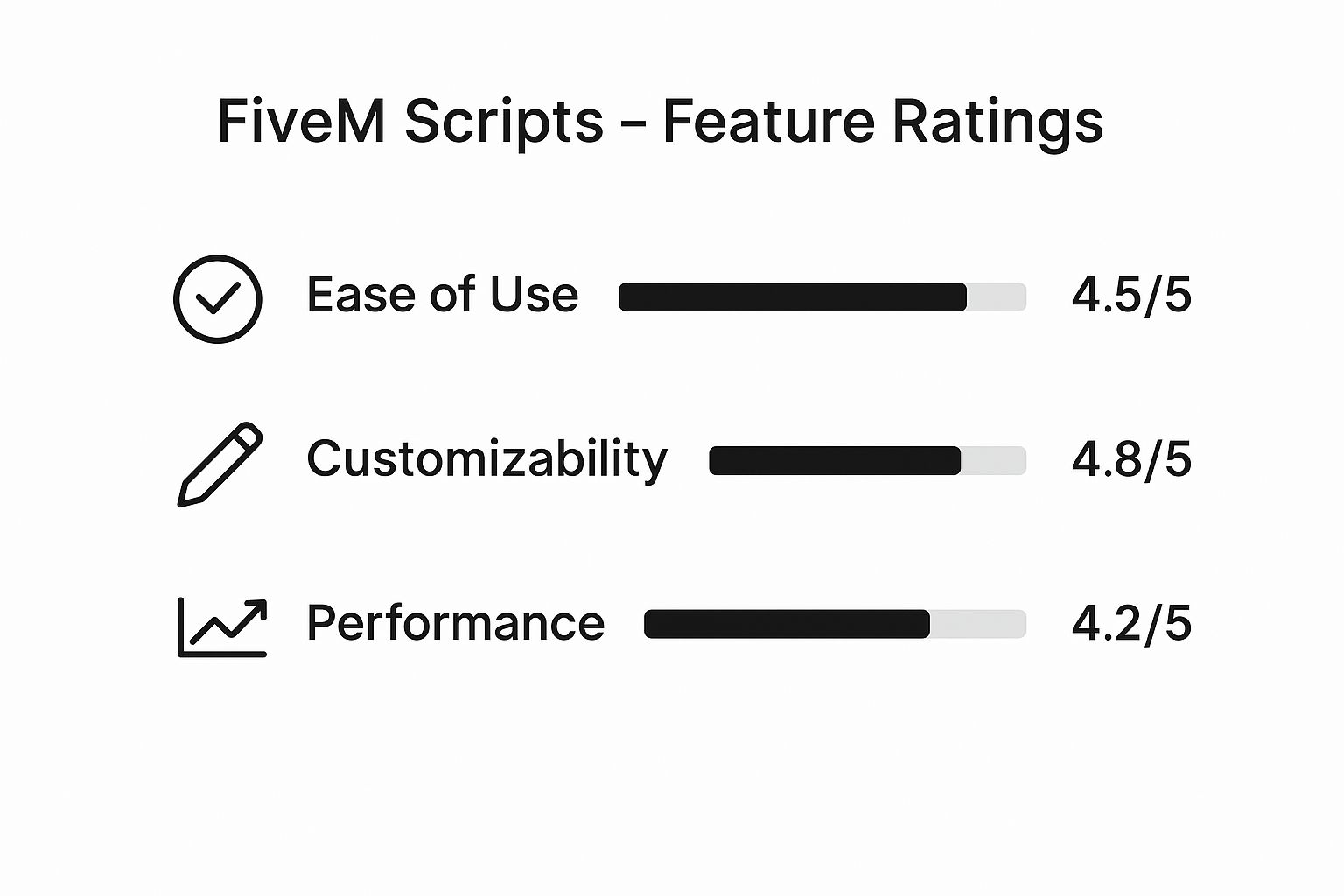
It’s clear that while having lots of options is great, making sure everything runs smoothly is just as important.
Key Differences at a Glance
To make this choice a little easier, let’s put ESX and QBCore side-by-side. This table cuts right to the chase, comparing the things that will matter most to you as a server owner.
Comparison of Popular FiveM Frameworks ESX vs QBCore
| Feature | ESX (Extended) | QBCore (Quality of Life) |
|---|---|---|
| Ease of Use for Beginners | Easier to start. A huge library of “plug-and-play” scripts gets you running fast. | A bit of a learning curve, but its logical structure makes sense once you get it. |
| Community Support | Massive. You’ll find countless tutorials and old forum posts to help you out. | Very active and helpful, especially on platforms like Discord. |
| Performance | Can be less optimized. Many older scripts weren’t built with performance as the top priority. | Generally faster. It was designed from the ground up for efficiency. |
| Script Availability | The biggest library out there. If a script exists, it probably exists for ESX. | Smaller but growing quickly. The focus is more on quality over sheer quantity. |
No matter which framework you choose, a well-organized database is the engine that keeps your server running smoothly. For a great deep dive into this, check out this guide on Mastering Database Design Principles.
The right framework really just depends on your goals. Want to get a server up fast with the widest selection of features? ESX is a great starting point. Prioritizing peak performance and a clean slate for custom development? QBCore is probably your best bet for the future.
In the end, both frameworks are powerful tools that support the core scripts every server needs to feel alive, such as:
- Job Scripts: These create the entire economy and player roles, like police, EMS, or mechanics. One fantastic example is the qb-Police Job + MDT & Evidence script, which provides an all-in-one law enforcement package for QBCore.
- Inventory Scripts: These give players a way to see and manage their items, money, and weapons.
- Utility Scripts: This covers all the behind-the-scenes stuff like admin menus, anti-cheat systems, and chat management.
Picking your framework is the first real step on your server development journey. Take a moment to think about your long-term vision, and you’ll build something amazing on a foundation you can trust.
How to Find and Safely Install FiveM Scripts
Once you’ve got your framework picked out, it’s time for the fun part: adding all the features that make your server unique. This is where you bring your world to life, but it’s also a common stumbling block for new server owners. Finding good, safe FiveM scripts is the absolute key to building a stable server that players will come back to again and again.

Diving into the world of scripts can feel like walking through a minefield. You’ll find some amazing resources, but you’ll also find plenty that are outdated, broken, or even designed to cause harm. Knowing where to look—and what to look for—will save you a massive headache and keep your server secure.
Where to Find Reputable Scripts
Trust me on this: not all script websites are created equal. Sticking to well-known, trusted platforms is the single best thing you can do to get quality code.
Here’s where the pros go:
- Official FiveM Forums (Cfx.re): This should always be your first stop. The official forums have a huge section for script releases where developers share their work. Most of it is open-source and has been looked over by other experienced community members.
- GitHub: A massive number of FiveM scripts call GitHub home. It’s the heart of open-source development, letting you see the actual code, check for updates, and even pitch in on projects you believe in.
- Reputable Marketplaces: If you’re looking for premium scripts with all the bells and whistles, paid marketplaces are a solid bet. They usually offer customer support and a certain level of quality control. If you go this route, it’s worth learning more about platforms like Tebex for FiveM to see how they handle secure payments and script delivery.
Vetting Scripts for Safety and Quality
Hold on! Before you download and install anything, you need to do a little homework. A single bad script can punch security holes in your server, cause it to crash constantly, or just plain not work with your other resources.
The biggest red flag you can find is obfuscated code. This is code that’s been intentionally scrambled to hide what it does. While some developers say it’s to protect their work, it also makes it impossible for you to know what’s really running on your server. It could contain backdoors or malware, so my advice is to steer clear completely.
Always, always read the reviews and community feedback. Check the forum thread, the GitHub “Issues” tab, or the marketplace reviews. What are other server owners saying? Are they finding bugs? Is the developer actually helping people? A good reputation goes a long way.
A Simple Step-by-Step Installation Guide
Getting a script installed is actually pretty easy once you’ve done it a couple of times. It boils down to a few key steps, but you have to get them right.
Here’s how you add a new resource to your server:
- Download the Script: Grab the files from wherever you found them. They’ll almost always come in a
.zipfile. - Extract and Place the Folder: Unzip the file. You should now have a single folder containing all the script’s assets. Drag this entire folder into your server’s
resourcesdirectory. - Update Your server.cfg File: This is the most important part. Open up your
server.cfgfile—this is the main control panel for your server. You need to add a line that tells your server to start or “ensure” this new script.
Let’s say the script folder is named qb-policejob. You would add this exact line to your server.cfg:
ensure qb-policejob
Here’s a pro tip: organize your server.cfg! Group your scripts together logically. For example, put all your core QBCore scripts in one block, then all your job scripts in another, and so on. It makes finding things and troubleshooting a million times easier down the road.
Essential Scripts for Every New Roleplay Server
Getting a new FiveM roleplay server off the ground is a lot like building a house. You can’t start hanging pictures on the wall before you’ve poured the foundation and put up the frame. This section is all about that foundation—the core FiveM scripts that provide the essential backbone for any community worth joining.
Think of this as your must-have list. If you get these foundational pieces right, you’ll create a stable and immersive world that you can build on later. Skip them, and your server will feel clunky and empty, no matter how many cool cars or custom jobs you add down the road.
The Absolute Must-Haves
Before players can even think about complex heists or running a business, they need the basic tools to exist and interact in your world. These scripts are non-negotiable for a modern server and should be the very first things you install.
- A Robust Voice System: Roleplay lives and dies by communication, and text chat just doesn’t cut it. You need a proximity-based voice script for genuine immersion. Options like PmaVoice or MumbleVOIP are fantastic because they let players hear each other based on distance, making conversations feel real and intense situations feel urgent.
- A Modern Inventory System: How players manage their gear is a huge part of the game. A script like ox_inventory has become the gold standard for a reason—it’s clean, packed with features, and runs smoothly. Its simple drag-and-drop interface feels natural for everyone, from first-time RPers to seasoned vets.
- A Multi-Character and Spawn Selector: One of the best parts of roleplay is creating different personas. A multi-character script allows players to have unique characters, each with their own story, job, and bank account. Pair that with a spawn selector, and they can choose to start their session wherever makes sense, like their apartment or their last known location.
These three systems are the bedrock of the player experience. They’re the first thing people will notice, so picking high-quality, well-supported scripts is key to keeping them around.
A server’s success is often built on the quality of its foundational scripts. A smooth inventory and a clear voice system are more important for keeping new players than any single custom job.
Laying the Groundwork for Society
Once your players have the basic tools, it’s time to give them a world to interact with. That means establishing a sense of order and purpose. This is where job scripts come in, acting as the engine for your server’s economy and social dynamics.
For any new server, the very first job you should add is for law enforcement. It immediately creates a source of conflict, interaction, and roleplay for the entire server.
esx_policejobfor ESX Servers: This is the classic, go-to police script for the ESX framework. It covers all the basics like cuffing, jailing, and fining players, giving you an instant police presence.qb-policejobfor QBCore Servers: The QBCore version is built with its modern structure in mind, often including more integrated features like evidence lockers and dispatch systems right from the start.
By starting with a police job, you immediately set the rules of the world. It gives one group of players a clear objective while providing a necessary counter-balance to the criminal activities other players will naturally gravitate towards.
Recommended Starter Products
You can definitely simplify this process with pre-made packages or premium scripts that offer more features and dedicated support. For instance, the qb-Police Job + MDT & Evidence script is an incredible all-in-one solution for QBCore servers. It bundles the job with a mobile data terminal (MDT) and an evidence system, saving you a ton of configuration time.
On the ESX side, a product like esx-multicharacter provides a polished and reliable character selection system. Investing a little in a solid, well-coded version of these essentials will prevent countless headaches later. It ensures your server’s core functions are stable, freeing you up to focus on the unique content that will make your community special.
Keeping Your Server Fast and Stable
It’s tempting to keep adding cool new features to your server. But before you know it, you’re running hundreds of fivem scripts, and players start complaining about lag, crashes, and endless loading screens. The secret to a high-performing server isn’t about piling on the most scripts—it’s about choosing the right ones.
Think of every script you add as a tiny tax on your server’s resources. Each one takes a little slice of your CPU (its thinking power) and RAM (its short-term memory). A handful of well-made scripts are no problem, but dozens of poorly coded or redundant ones create a constant drag that slows the entire game down for everyone.
This resource drain becomes a huge bottleneck when your server gets popular. More players mean more activity for the server to process. If it’s already struggling under the weight of too many scripts, the whole experience can grind to a halt. The first step to a stable server is understanding this simple trade-off between script quantity and server health.
The Art of Script Optimization
Optimizing your server is a continuous job, not a one-and-done task. It all starts with being picky about what you install in the first place. A script might promise an amazing feature, but if it’s coded badly, it could chew up ten times the resources of a cleaner, simpler alternative. Always try to get your scripts from reputable developers known for making efficient code.
Here are a few practical things you can do to keep your server running smoothly:
- Choose Low-Resource Scripts: Look for scripts marketed as “optimized” or “low-res.” Before you install anything, check reviews and ask other server owners how it impacted their performance.
- Audit Your Resources Folder: At least once a month, take a look through your
resourcesfolder. If you see a script nobody uses or one you’ve already replaced, get rid of it. Every inactive script is just dead weight. - Keep Everything Updated: Developers are constantly pushing out updates to fix bugs and improve performance. Make sure your framework (like ESX or QBCore) and all your scripts are running their latest versions.
This kind of hands-on management is what separates the good servers from the great ones. Following established infrastructure monitoring best practices will also help you spot problems early and maintain stability for the long haul.
Managing Server Load and Resources
Knowing your server’s hardware limits is just as critical as managing its software. FiveM servers need a good chunk of RAM, and that need grows with every player and every complex script you add. For instance, a medium-sized server with 60 players might need around 8.2GB of RAM just to run without issues, once you account for the game, the framework, scripts, and player data.
The takeaway is simple: quality over quantity. A server with 50 well-coded, essential scripts will always outperform one with 200 bloated or redundant ones. Your goal is to deliver a smooth, enjoyable experience that makes players want to stick around.
For larger communities, performance management is even more crucial. Some big servers use techniques like distributing the workload across multiple servers to prevent a single crash from taking down the whole network. This is a more advanced topic, but you can get the rundown on how it works in our guide explaining what server load balancing is.
Building a fast, stable server takes discipline. You have to resist the urge to install every shiny new script you find. Instead, focus on creating a curated, optimized set of resources that gives your community what they want without sacrificing the performance that keeps them logging back in.
Using Unique Scripts to Grow Your Community
So, you’ve got your server up and running. The basics are in place. But with thousands of other servers out there, all vying for the same players, a functional world is just the starting point. This is where you go from simply running a server to building a real community. The secret? Unique, custom fivem scripts that give your server a personality.

Think of it this way: every restaurant needs a kitchen and some tables. That’s the baseline. But what makes people line up down the street is that one signature dish they can’t get anywhere else. Your unique scripts are that signature dish. They’re the custom jobs, the special events, and the original gameplay mechanics that become your server’s main draw.
Crafting Your Server’s Identity
Now for the fun part. What kind of world do you want to build? A gritty, crime-filled city? A laid-back life simulator where civilians are the focus? Or maybe a high-octane racing hub? Whatever your vision is, your unique scripts need to bring it to life.
Here are a few ideas to get the wheels turning:
- One-of-a-Kind Jobs: Forget another generic trucking job. What about a deep-sea salvage operation? Or a paranormal investigation career that takes players to haunted locations?
- Custom-Scripted Events: Imagine a server-wide zombie outbreak or an alien invasion that forces everyone to team up just to survive. These are the moments people remember.
- Unique Gameplay Loops: You could develop a system for player-run businesses that are truly dynamic, where the server’s economy actually shifts based on supply and demand.
These are the kinds of features that players will tell their friends about. For example, if you want to add a unique criminal element, the qb-methrun script offers a detailed drug-running system that’s a world away from the basic mechanics you see everywhere else.
The most successful servers don’t just have more scripts; they have smarter, more creative scripts. The goal is to create an experience players can’t find anywhere else. That makes your server a destination, not just another option on a list.
Building and Promoting Your Vision
Of course, creating amazing features is only half the battle. If nobody knows they exist, what’s the point? This is where marketing and community building come in, especially with so much competition in North America and Europe. You have to get the word out.
Use official server lists and social media to showcase what makes your server special. A solid strategy that combines great scripts with active community engagement has helped countless servers grow into the thousands. For more on getting set up, you can find a great guide over at Goodleaf Development.
While the essential scripts lay the foundation, it’s these unique, thoughtfully crafted features that build a legacy. They’re what turn first-time visitors into loyal members and keep your server thriving for years to come.
Got Questions About FiveM Scripts? We’ve Got Answers
As you get your hands dirty customizing your FiveM server, you’re going to hit some bumps and have a few questions. It happens to everyone. This section tackles some of the most common things people ask, giving you straight-to-the-point answers to get you back on track.
Can I Just Drop an ESX Script onto a QBCore Server?
That’s a definite no. Think of frameworks like ESX and QBCore as different operating systems, like Windows and macOS. An application built for one simply won’t run on the other without a complete rewrite.
Their core code is fundamentally different, so an ESX script will throw errors on a QBCore server, and the reverse is also true. Always, always double-check that the script you’re about to install was made for the framework you’re running.
For example, a high-quality script like the qb-Police Job with MDT & Evidence is built from the ground up to work perfectly with QBCore.
What’s the Real Difference Between Paid and Free Scripts?
Free scripts, especially those you find on places like GitHub, are fantastic for getting your feet wet. They can add some cool, simple features and are a great way to learn how things work without spending a dime.
Paid scripts from dedicated developers usually bring more to the table. We’re talking about more intricate systems, better performance, and—most importantly—someone to contact when you need support.
A word of caution: “paid” doesn’t automatically mean “better.” I’ve seen some amazing free scripts and some disappointing paid ones. Do your homework. Read reviews and check the developer’s track record before you buy anything.
My New Script Is Breaking Everything. How Do I Fix It?
Welcome to the club! Troubleshooting is 90% of being a server owner. When a script goes rogue, don’t panic. Just follow these steps:
- Check Your Console: Your first move should always be to hit F8 in-game (or check the server-side console) and look for red error messages. They often point you right to the misbehaving script.
- Play Detective: Not sure which script is the culprit? Go into your
server.cfg, put a#in front of the line that starts the new script, and restart the server. If the error is gone, you’ve found your problem child. - Reread the Instructions: Go back and make sure you installed it right. Did you install all the required dependencies? Is it in the right folder? Is it compatible with your game build?
If you’ve tried all that and are still stuck, it’s time to reach out to the developer for help. That’s often what you’re paying for with premium scripts!
At Scripts Tebex, our goal is to give you rock-solid, high-quality scripts that let you focus on building an amazing community. Check out our shop to find the tools you need to make your server stand out at https://scripts-tebex.io.