
Think of a popular coffee shop on a busy morning. One barista is frantically trying to keep up with a long line of caffeine-deprived customers. The line’s not moving, and people are getting frustrated. Now, imagine the manager opens two more counters, each with a fresh barista, and starts directing people to the next available one. Suddenly, everyone’s getting served quickly and efficiently.
That’s exactly what server load balancing does for your website or application. It’s the smart traffic manager for the digital world, making sure no single server gets overwhelmed by neatly distributing all the incoming user requests.
What Is Server Load Balancing?
At its core, server load balancing is the practice of spreading network traffic across multiple servers. This group of servers is often called a server farm or server pool. The main idea is to stop any one server from becoming a chokepoint, which can cause painfully slow performance or even bring your entire service down. By sharing the workload, you build a much more reliable and always-available application.
The magic happens thanks to a piece of software or hardware called a load balancer. It sits in front of your servers, acting as the main entry point and intelligently forwarding requests based on a set of rules. For a deeper dive into the mechanics, you can explore these core load balancing concepts, including ALB and NLB.
Why Load Balancing Matters
Let’s be honest, even the most powerful server will eventually crack under pressure during a traffic spike. This is a huge deal for dynamic online environments, especially those running on custom server setups like you might find at Code Studio. When too many people show up at once, you get slow page loads, failed transactions, and a terrible user experience. Load balancing is the direct solution to this headache.
A load balancer is the backbone of any scalable digital service. It is the key to maintaining a fast, responsive, and reliable experience for all users, regardless of traffic volume.
And this isn’t just a strategy for huge tech companies anymore. The proof is in the numbers. The load balancer market was valued at an impressive USD 6.26 billion in a recent year, and it’s expected to balloon to USD 19.40 billion by 2033. That’s a compound annual growth rate of 13.4%, which shows just how essential this technology has become for businesses of all sizes.
Putting a solid load balancing strategy in place delivers some huge wins:
- Improved Scalability: Need more capacity? Just add another server to the pool. Traffic gets distributed to it automatically, with zero downtime.
- Higher Reliability: If one of your servers goes down for maintenance or fails unexpectedly, the load balancer instantly stops sending traffic its way and reroutes it to the healthy ones. Your users never even notice.
- Enhanced Performance: By sending users to the server that can respond the fastest, you ensure quicker load times and a much smoother experience all around.
How a Load Balancer Prevents Downtime
To really get how a load balancer works, it helps to picture it as a super-efficient traffic cop standing at a busy intersection. It sits right between your users and your bank of servers, directing every single incoming request.
When someone tries to log in, load a page, or do anything else, their request doesn’t go straight to a server. First, it hits the load balancer.
The load balancer’s main job is to keep a constantly updated list of all the backend servers ready to do work—this group is often called a server pool. But before it sends any traffic to a server on that list, it needs to make sure the server is actually up to the task.
The Role of Health Checks
So, how does it know which servers are healthy? Through a clever little process called a health check. Think of it as the load balancer periodically tapping each server on the shoulder and asking, “Hey, you good?”
These are tiny, automated tests that run constantly. If a server gives the right response, it gets a green light and stays in the active rotation, ready to receive user requests.
But what if a server fails the check? Maybe it’s overloaded, suffering a hardware glitch, or just down for maintenance. The load balancer instantly and automatically yanks it out of the server pool. No more traffic gets sent its way until it passes a health check again.
This is the magic behind preventing downtime. A user never even knows a server went down. Instead of hitting a brick wall and seeing an error page, their request is seamlessly re-routed to a healthy server. It’s this smart, automatic redirection that makes your entire application so much more robust.
Hardware vs. Software Load Balancers
Load balancers aren’t a one-size-fits-all solution. They generally come in two flavors, and the right one for you really boils down to your specific needs, budget, and how complex your setup is.
- Hardware Load Balancers: These are dedicated physical boxes you install in your own data center. Built with specialized hardware, they’re absolute workhorses designed to handle huge amounts of traffic with minimal delay. Products like the F5 BIG-IP series or Citrix ADC are popular examples found in large, enterprise-level operations.
- Software Load Balancers: This is the more flexible approach. It’s an application that runs on standard servers, virtual machines, or in the cloud. They’re often more affordable and much easier to scale up or down, making them a go-to for modern web applications. Open-source solutions like NGINX and HAProxy are widely used.
The real goal here is to build a fault-tolerant system. By constantly checking on your servers and rerouting traffic on the fly, a load balancer ensures that one server hiccup doesn’t crash the whole party for your users.
This kind of proactive management is also a big deal for security. A huge part of keeping your service online involves building a strong defense against Distributed Denial of Service (DDoS) attacks, and a load balancer is a key player, spreading out malicious traffic so no single server gets overwhelmed.
For server admins looking to simplify their workflow, you can even pair this infrastructure with other tools. For instance, it’s possible to set up a Discord bot to control a server that can help with management tasks, letting you keep an eye on things without being tied to a terminal.
Choosing the Right Load Balancing Algorithm
The real magic behind a load balancer isn’t the hardware or software itself, but the algorithm running the show. This is the specific set of rules it follows to decide where to send incoming traffic. Think of it like a traffic cop at a busy intersection; their strategy for directing cars determines how smoothly everything flows. Picking the right one is what makes or breaks your application’s performance.
At the end of the day, the algorithm’s job is to answer one simple question: “Which server gets the next request?” The answer, however, can be simple or surprisingly complex, depending on the method you’ve chosen. Some are straightforward and predictable, while others are smarter, reacting to what’s happening on your servers in real time.
Static Load Balancing Algorithms
Static algorithms are the most straightforward. They distribute traffic according to a fixed, unchangeable schedule. They don’t check how busy a server is or how well it’s performing, which makes them super easy to set up but sometimes inefficient when traffic gets spiky.
One of the most common static methods is Round Robin. It works just like dealing a deck of cards. The first request goes to server 1, the second to server 2, the third to server 3, and then it circles back to server 1. This works great when all your servers are more or less identical in power and capacity.
A slightly more sophisticated version is Weighted Round Robin. This method lets you account for differences in your server hardware. Let’s say you have one beefy server that’s twice as powerful as the others. You can assign it a “weight” of 2, and the load balancer will send it double the traffic. It’s a simple way to make sure your best hardware is pulling its weight.
The infographic below shows how different types of load balancers—hardware, software, and cloud-based—stack up against each other in cost, flexibility, and upkeep.
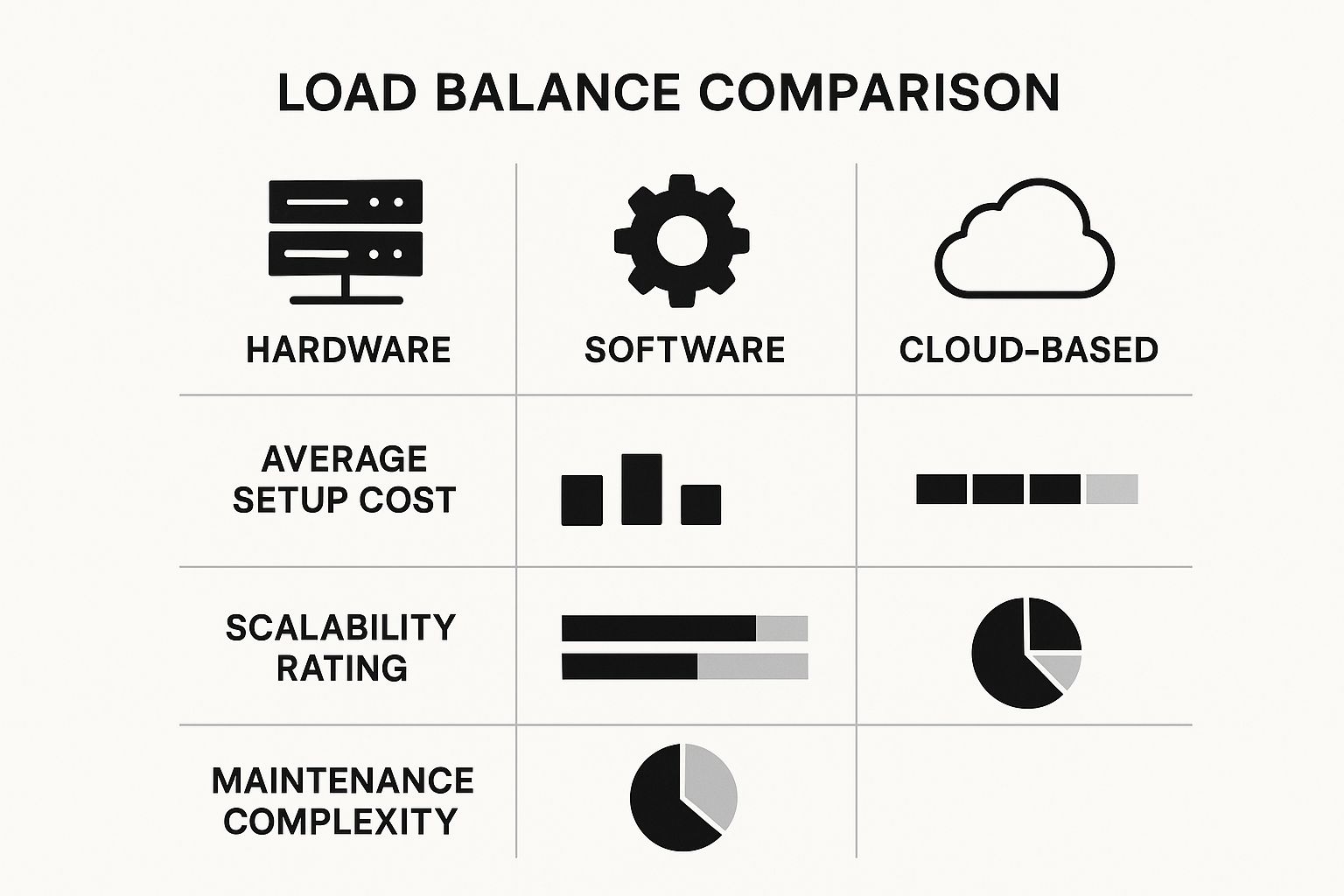
As you can see, while dedicated hardware brings the raw power, cloud solutions are often the go-to for modern apps because they’re easier to scale and manage financially.
Dynamic Load Balancing Algorithms
This is where things get really interesting. Dynamic algorithms are much smarter because they actually look at the current health and load of each server before deciding where to send the next request. This real-time analysis means your resources get used much more efficiently, which is a huge deal for complex or high-traffic applications.
The Least Connections method is a classic example. It’s brilliantly simple: the load balancer sends the next request to whichever server currently has the fewest active connections. It’s like a grocery store manager opening a new checkout lane and calling out, “I can take the next person here!” to keep any one line from getting too long. This is a go-to strategy for environments with long-lived connections, like specialized gaming communities. For anyone running high-demand game environments, managing traffic effectively on FiveM servers is essential for keeping player latency down.
Another popular dynamic method is IP Hash. This one is a bit more technical. It takes the user’s IP address, runs it through a mathematical function (a “hash”), and uses the result to assign that user to a specific server.
The big win with IP Hash is something called session persistence, or “stickiness.” It ensures that a particular user always gets sent back to the same server on subsequent visits. This is absolutely critical for things like e-commerce shopping carts or online banking sessions, where the server needs to remember who you are and what you’re doing.
Choosing the right algorithm isn’t just a technical detail; it’s a strategic decision that directly impacts user experience. Your choice will come down to your specific needs, from the kind of servers you’re running to the type of application you’re supporting.
To help clarify the options, here’s a quick breakdown of the most common algorithms and where they shine.
Comparing Common Load Balancing Algorithms
| Algorithm | How It Works | Best For | Key Advantage |
|---|---|---|---|
| Round Robin | Cycles through servers sequentially. | Environments with identically configured servers. | Simple to implement and fair distribution. |
| Weighted Round Robin | Distributes traffic based on a pre-assigned “weight” for each server. | Server pools with varying capacities and power. | Ensures more powerful servers handle more traffic. |
| Least Connections | Sends new requests to the server with the fewest active connections. | Applications with long-lasting user sessions (e.g., gaming, streaming). | Prevents any single server from becoming a bottleneck. |
| IP Hash | Uses the client’s IP address to determine which server receives the request. | E-commerce sites, web apps requiring session persistence. | Creates “sticky” sessions, ensuring a user returns to the same server. |
Ultimately, the best algorithm is the one that best fits your infrastructure and application goals. A simple setup might be fine with Round Robin, but a complex platform will almost certainly benefit from a more intelligent, dynamic approach.
Key Benefits of Smart Load Balancing
Putting server load balancing in place isn’t just a technical fix; it’s a fundamental decision that directly shapes your application’s reliability and how users perceive it. When you look past the how and focus on the why, you start to see the powerful advantages that intelligent traffic management offers. It’s the difference between a fragile chain and a resilient web.
The most obvious and critical benefit is achieving high availability. Picture this: one of your servers suddenly crashes. Maybe it’s a hardware failure, maybe a software bug. Without a load balancer, every user connected to that server, or trying to connect, hits a brick wall. All they see is an error page.
With a load balancer standing guard, it instantly spots the failure through its routine health checks. It immediately stops sending traffic to the dead server and reroutes all new requests to the healthy ones still running. This happens so quickly that your users are completely unaware a problem even occurred. Your application stays online, creating a fault-tolerant system that builds trust.

Driving Scalability and Performance
Another huge win is effortless scalability. As your community grows and traffic spikes, you can simply spin up new servers and add them to the pool. The load balancer automatically recognizes these new resources and starts feeding them a share of the workload. You don’t need downtime or complicated manual changes—you can scale your capacity on the fly to meet demand.
This dynamic scaling directly translates into a major boost in performance and speed. Load balancers use smart algorithms to direct each user’s request to the server best equipped to handle it at that moment. This ensures no single server gets overwhelmed, which would slow down the experience for everyone. The end result is faster load times and a much smoother, more professional experience for your users.
Load balancing is the foundation of a modern, scalable application. It allows you to grow your services without sacrificing performance or reliability, ensuring a consistent experience for every user.
Finally, load balancing makes server maintenance a breeze. Need to apply updates, patches, or even upgrade hardware on a machine? Just take it out of the active pool. The load balancer seamlessly redirects its traffic to other servers, letting you do your work during regular hours without impacting a single user.
These benefits combine to create a robust, scalable, and highly reliable online service. For more insights on managing and optimizing server environments, explore the articles on our Tebex blogs.
Types of Load Balancers and Top Solutions
When you start digging into server load balancing, you’ll quickly find out they aren’t all created equal. They operate at different “layers” of the network, which really just means they look at different kinds of information to make their decisions. The two main types you’ll constantly run into are Layer 4 and Layer 7 load balancers.
Think of a Layer 4 load balancer like a traffic cop at a simple intersection. They only care about the most basic information—where the car came from (IP address) and which lane it’s headed for (the port number). They don’t peek inside the car; they just direct traffic based on these simple network details. This approach is incredibly fast and works great for straightforward traffic distribution.
Application-Aware Load Balancing
Now, a Layer 7 load balancer is much more like a valet at a fancy hotel. This valet doesn’t just park the car; they know what kind of car it is, who the driver is, and if they have any special requests. These are often called Application Load Balancers (ALBs) because they operate at the application level.
They can inspect the actual content of the requests, looking at things like HTTP headers, cookies, and specific URL paths. This allows for far more intelligent routing. For example, you could send all video streaming requests to servers with fast GPUs, while directing all shopping cart traffic to a different set of servers. It’s a much smarter way to handle complex applications.
The global market for cloud load balancers really drives home how vital this technology is. It was valued at around USD 8.9 billion recently and is expected to rocket to USD 50.03 billion by 2035, growing at a compound annual rate of 16.9%. You can dig into the numbers in this cloud load balancer market analysis.
Leading Load Balancer Products
There’s no shortage of fantastic load balancing tools out there, from hardware you can rack in your own data center to services fully managed by cloud providers. If you’re already invested in a cloud ecosystem, their native options are usually the path of least resistance.
For example, here’s a glimpse of the dashboard for AWS Elastic Load Balancing. It gives you a single place to manage all your load balancers.

As you can see, cloud platforms make it pretty straightforward to set up and keep an eye on Application, Network, and Gateway Load Balancers.
Some of the biggest players in the cloud space are:
- AWS Elastic Load Balancing (ELB): A comprehensive managed service from Amazon offering Application, Network, and Gateway load balancers for specific use cases.
- Google Cloud Load Balancing: A fully distributed, software-defined service that’s a core part of the Google Cloud ecosystem, offering both global and regional options.
- Azure Load Balancer: Microsoft’s own solution for ensuring high availability and solid network performance for applications running within the Azure cloud.
But what if you aren’t all-in on the cloud, or you prefer an open-source approach? You’re still covered. F5 BIG-IP is a long-standing giant in the enterprise world, offering powerful hardware and software. On the open-source side, NGINX (with its NGINX Plus commercial offering) and HAProxy are two of the most popular and respected software load balancers on the planet, known for their blistering speed and flexibility.
Ultimately, the right choice comes down to your specific infrastructure, performance goals, and, of course, your budget.
Frequently Asked Questions About Server Load Balancing
As you get closer to actually setting up a load balancer, some very practical questions are bound to pop up. It’s one thing to understand the theory, but another to see how it fits into a real-world setup.
Let’s tackle a couple of the most common questions people have. Getting these sorted out can save you a lot of headaches down the road.
What’s the Difference Between Load Balancing and Failover?
It’s easy to mix these two up, but they solve different problems. Think of load balancing as a proactive strategy for efficiency, while failover is a reactive plan for disaster recovery.
Load balancing is always on, constantly splitting incoming traffic among your pool of active servers. Its main job is to keep everything running smoothly and prevent any one server from getting swamped.
Failover, on the other hand, is like an emergency backup. A secondary, standby server sits idle until the primary one goes down completely. Only then does it spring into action, taking over so your service stays online.
Here’s a simple way to think about it: Load balancing is like having several cashiers open at a busy store to keep the lines moving. Failover is like the store manager who only opens a new register when one of the cashiers suddenly has to leave.
How Does SSL Termination Work with a Load Balancer?
Handling SSL/TLS encryption takes a surprising amount of processing power. When every single server has to encrypt and decrypt traffic, it bogs them down. This is where SSL termination (or SSL offloading) comes in.
Instead of making your application servers do the heavy lifting, the load balancer handles all the encryption and decryption at the front door. It decrypts the request from the user, figures out which server to send it to, and then can even re-encrypt it to send over your secure internal network.
This simple change frees up your backend servers to do what they do best: run your application. The performance boost can be significant.
At Scripts Tebex, we build custom digital tools and UI enhancements that help server administrators create truly unique player experiences. Our scripts and plugins are designed to give you more control and smarter automation for your simulation server.