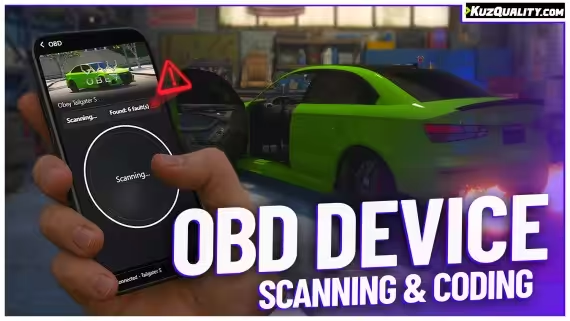
FiveM OBD Car Device adds vehicle fault scanning, live engine data, 15+ mod slots, and phone app integration for mechanic RP. Standalone via kq_link, any framework.
Mechanic RP on most FiveM servers bottoms out at a repair animation and a health bar. The OBD Car Device script goes further: it gives mechanics and vehicle owners an actual diagnostic interface — scan a vehicle, read stored fault codes, check live engine data, and push custom faults from external scripts like your mechanic job. It’s the difference between “your car is damaged” and “fault P0171: fuel system lean, engine temperature at 97°C.”
What the OBD Script Adds
Players or mechanics use a configurable item to scan a nearby vehicle. The scan returns stored fault codes from a pre-built library of 10+ codes, plus real-time readings for engine state and vehicle component data. Beyond diagnostics, the script includes a mod application system with 15+ pre-built modification slots — mechanics can apply coded upgrades and record them against the vehicle’s OBD profile. Custom faults can be injected via export from any external script, so a crash event in your driving physics script can automatically write a fault code that shows up the next time the OBD device is used.
Phone integration is a differentiator here. The script supports lb-phone, lb-tablet, yseries phone, qs-smartphone, and gksphone — so the OBD reader can live inside a player’s phone rather than as a standalone menu, which keeps the interaction pattern consistent with how your players already interact with the world.
Key Features
Vehicle fault scanning with 10+ pre-built fault codes
15+ pre-built modification slots — fully expandable via config
Real-time live data monitoring for engine and vehicle state
Custom fault injection via export — compatible with external mechanic scripts
Full localisation system — all UI strings translatable
Partially accessible code — frontend and config adjustable
Approximately 5,000 lines — a production-weight implementation
Framework-agnostic via the free kq_link compatibility layer
Framework and Dependencies
The OBD Car Device uses kq_link, a free open-source bridge layer, for framework, inventory, notification, and dispatch compatibility. This approach means the script works with ESX, QBCore, or any other framework without requiring separate builds. Install kq_link, configure your framework in its settings, and the OBD device picks up the integration automatically. The t1ger_mechanic script has an official integration that writes fault codes from mechanic job actions — a good pairing if your server is already running that resource.
Where This Fits in Your Server Economy
If your mechanic shop currently handles repairs through a basic job script with no inspection layer, the OBD device adds the diagnostic step that makes mechanic RP feel like a real trade. Players bring vehicles in, the mechanic scans them, reads off codes, and works through a repair list rather than just holding a button. For servers that want high-effort civilian jobs, that workflow depth is what separates a busy mechanic shop from a repair kiosk that nobody uses.
5 reviews for FREE OBD Car Device
Marcus Hale –
Rated 4 out of 5
Didn’t expect much from something free but it’s honestly great. The fault scanner works and the live-data readout is super handy. Only thing I’d like is more built-in faults without needing to add them myself.
Elena Brooks –
Rated 5 out of 5
Super slick UI and our mechanics actually roleplay diagnostics now instead of guessing. Integrates perfectly with our phone system. Zero issues so far.
Travis M. –
Rated 4 out of 5
Cool little device. Setup took about 3 minutes. I wish the mod list had more extreme options, but being able to add my own makes it worth it.
Kayla Donovan –
Rated 5 out of 5
Free? Seriously? We used to fake OBD checks with text commands. Now players plug in a device, scan, and choose what to tweak. Big upgrade.
Joel Carter –
Rated 5 out of 5
Clean. Fast. Works.
Only logged in customers who have purchased this product may leave a review.
24/7 Customer Support
We have a robust team of developers and support team to resolve any issues. Please follow instructions on your email to contact support team.
More Details
This product is FULLY OPEN SOURCE which means you can edit it however you like.
Updates are provided on your email and Downloads section in 'My Account' section.
We here at Tebex are dedicated to provide you with best experience.




![[MLO] Davis Sheriff Station Gta 5 Interior + LSPD Theme for FiveM, altV and RageMP](https://scripts-tebex.io/wp-content/uploads/e6fea1bbc72ce8bb88cc9bdbfd86a42eeeeff4fd-300x169.avif)
![[MLO] Davis Sheriff Station Gta 5 Interior + LSPD Theme for FiveM, altV and RageMP](https://scripts-tebex.io/wp-content/uploads/3BOsprL-300x169.avif)

Marcus Hale –
Didn’t expect much from something free but it’s honestly great. The fault scanner works and the live-data readout is super handy. Only thing I’d like is more built-in faults without needing to add them myself.
Elena Brooks –
Super slick UI and our mechanics actually roleplay diagnostics now instead of guessing. Integrates perfectly with our phone system. Zero issues so far.
Travis M. –
Cool little device. Setup took about 3 minutes. I wish the mod list had more extreme options, but being able to add my own makes it worth it.
Kayla Donovan –
Free? Seriously? We used to fake OBD checks with text commands. Now players plug in a device, scan, and choose what to tweak. Big upgrade.
Joel Carter –
Clean. Fast. Works.