Detective Tools for FiveM reveals cause of death, injury location, and time elapsed when examining bodies — standalone, ESX, QBCore, and QBox compatible with 0.00ms idle resource usage.
The default GTA V death system tells everyone in the area absolutely nothing useful for roleplay. Bodies disappear, injuries are invisible, and detectives have no more information than a passerby. Detective Tools fixes that gap by turning every player and NPC death into an investigable scene — one that actually rewards the officers and EMS crews who respond to it.
What the Investigation Reveals
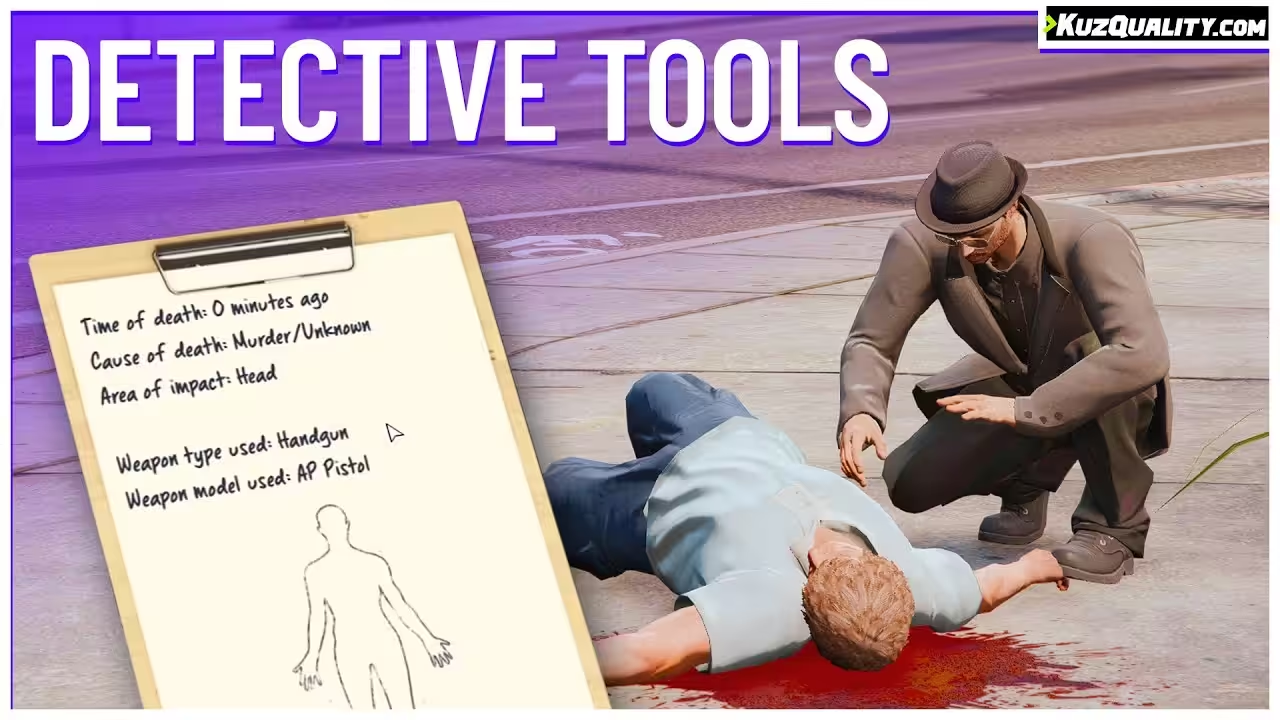
When a detective examines a body using this script, the system surfaces three pieces of information that standard FiveM resources don’t provide: the cause of death (accident versus deliberate), the specific body region that took the fatal blow, and how much time has elapsed since death. That last detail matters more than it sounds — it changes whether an EMS crew can still roleplay resuscitation attempts and gives investigators a timeline to work with.
Body examination via qtarget, qb-target, or ox_target — no target system required for standalone use
Cause-of-death determination: accident or deliberate action
Precise injury location identifying which body area received the critical blow
Time-of-death display showing minutes elapsed since the player or NPC died
Job-gated access for ESX and QBCore — restrict examination to detective, police, or EMS roles
Standalone mode for custom frameworks or servers without ESX/QBCore
vRP, TMC, and QBox support alongside the primary frameworks
Polished UI with optimized 0.00ms–0.01ms resource usage at all times
Highly configurable output and interaction settings
Standalone First, Framework Optional
The script ships as a standalone resource and adds no framework dependency to your server. ESX and QBCore integration is layered on top purely to handle job-based access restrictions — if your detective role should require a badge to examine a scene, that’s a two-line config change. For servers that want every player able to investigate, the standalone mode works without touching job tables at all.
Why Body-Area Data Changes EMS Roleplay
Most EMS scripts know a player is dead. Detective Tools tells them where the damage was concentrated — head shot versus torso versus limbs. That single addition opens up roleplay that would otherwise require out-of-character coordination: an EMS medic can realistically roleplay treating the specific injury, and a detective can build a narrative around the physical evidence without the victim having to explain what happened in OOC chat.
10 reviews for Detective Tools
Sabrina R. –
Rated 5 out of 5
Super clean, highly optimized. Our detectives and EMS love it.
Ethan Walsh –
Rated 5 out of 5
Super clean UI and insanely smooth performance. Our EMS players love that they can actually see where the fatal injury happened. Adds a ton of immersion without any lag.
Tyler Brooks –
Rated 5 out of 5
Bro… this makes investigations actually fun.
Sofia Mendoza –
Rated 4 out of 5
Works great and setup was quick. Only thing missing for me is a log history, but everything else is on point.
Hannah Cooper –
Rated 5 out of 5
Best purchase this month. Players keep using it every time there’s a scene. It adds a cool CSI vibe without being complicated.
Caleb Foster –
Rated 4 out of 5
We mainly use it for EMS to determine cause of death. Really helpful for RP and doesn’t conflict with any of our other resources.
Avery Collins –
Rated 5 out of 5
Love it. Adds depth to crime scenes without slowing down the server. Worth every cent.
Jordan Ellis –
Rated 4 out of 5
I like that you can restrict access to only certain jobs. Players immediately understood how to use it and it doesn’t tank performance at all.
Liam Mercer –
Rated 5 out of 5
Unexpectedly good. My players immediately started doing proper investigations instead of just guessing. The UI feels modern and it runs smooth with zero noticeable performance hit.
Harvey Nolan –
Rated 4 out of 5
Solid addition. Works fine out of the box, just wished there were more customization options for messages, but overall very worth it.
Only logged in customers who have purchased this product may leave a review.
24/7 Customer Support
We have a robust team of developers and support team to resolve any issues. Please follow instructions on your email to contact support team.
More Details
This product is FULLY OPEN SOURCE which means you can edit it however you like.
Updates are provided on your email and Downloads section in 'My Account' section.
We here at Tebex are dedicated to provide you with best experience.


![[ESX] FiveM Hud v3 Premium HUD Script](https://scripts-tebex.io/wp-content/uploads/d9e21fffaa2cdefcee56442c21bf065f0b92dfe6-300x169.avif)






![[QB] Cocaine Mission for qb-core framework FIVEM](https://scripts-tebex.io/wp-content/uploads/698846a6429403d12cbbd5d57e91449bd412b685-300x169.avif)




Sabrina R. –
Super clean, highly optimized. Our detectives and EMS love it.
Ethan Walsh –
Super clean UI and insanely smooth performance. Our EMS players love that they can actually see where the fatal injury happened. Adds a ton of immersion without any lag.
Tyler Brooks –
Bro… this makes investigations actually fun.
Sofia Mendoza –
Works great and setup was quick. Only thing missing for me is a log history, but everything else is on point.
Hannah Cooper –
Best purchase this month. Players keep using it every time there’s a scene. It adds a cool CSI vibe without being complicated.
Caleb Foster –
We mainly use it for EMS to determine cause of death. Really helpful for RP and doesn’t conflict with any of our other resources.
Avery Collins –
Love it. Adds depth to crime scenes without slowing down the server. Worth every cent.
Jordan Ellis –
I like that you can restrict access to only certain jobs. Players immediately understood how to use it and it doesn’t tank performance at all.
Liam Mercer –
Unexpectedly good. My players immediately started doing proper investigations instead of just guessing. The UI feels modern and it runs smooth with zero noticeable performance hit.
Harvey Nolan –
Solid addition. Works fine out of the box, just wished there were more customization options for messages, but overall very worth it.